 QuickMerge
A PDF is a document format designed to describe pages with positioned text, graphics and other resources. Two files with the same .pdf extension can behave very differently: one may contain searchable text, another only scanned images, and a third may include interactive fields.
Compare three files before choosing a tool
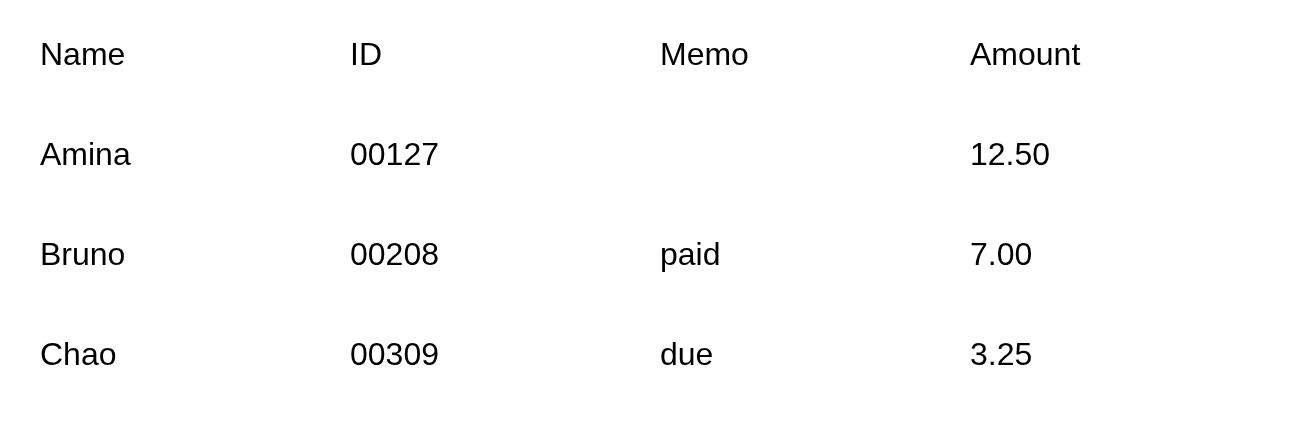
These three synthetic files contain the same table values. Their appearance does not tell you whether a converter can recover text or whether a recipient can fill in a field. Download them to try the checks without using a personal document.
| Download | Pages | Bytes | Text extraction | Editable fields |
|---|---|---|---|---|
| Selectable text (PDF) | 1 | 1,973 | Table characters available | 0 |
| Image-only scan (PDF) | 1 | 23,233 | No text characters | 0 |
| Text with an editable field (PDF) | 1 | 3,387 | Table characters available | 1 |
Predict the result, then try it
- Open the selectable-text sample and search for 00127. Copy a row into a text editor. The characters are available, but spacing is not the same as spreadsheet cell structure.
- Open the image-only sample and repeat that search. A viewer without automatic OCR cannot find the characters. PDF to Word should report that no text was found. Use OCR on this file if you need recognized text, then compare every identifier and amount with the image.
- Open the form sample in a PDF viewer that supports interactive fields. Change SAMPLE-001, save a copy and reopen that exact copy. A successful download does not establish that an edited field was saved.
- Compare the saved result with the source: three records, leading zeros in each ID, an empty memo for Amina, and amounts totaling 22.75. A correct total does not rule out two offsetting errors.
What these results change about your workflow
A small image PDF can still need OCR. A text PDF can lose its text layer if it is rasterized to reach a byte target. A visible form value can survive as pixels while its editability disappears. Choose the operation by the feature you need to retain: text extraction, image recognition, or editable fields.
These examples have one page each. Their exact byte sizes and structures are checked from the saved files. They establish these specific results; they do not predict phone performance, recognize every scan, validate signatures or establish accessibility.
A fixed page is different from an editable paragraph
A word processor can reflow paragraphs as you change a margin or font. A PDF primarily describes the delivered page. It can preserve appearance without storing all the semantic relationships needed to reconstruct the original table or paragraph structure.
That distinction explains why PDF to Word may recover useful text while losing layout. If you have the authoring document, edit that source and export another PDF instead of expecting a perfect round trip.
Check whether the file contains usable text
Try selecting and copying a sentence. If readable text arrives in another application, the file has a usable text layer in that area. If selection fails, the page may be a scan. Some scanned pages include OCR text that is searchable but imperfect.
Recognize forms, metadata and signatures
- Form fields can hold values independently of the printed page appearance. A flattened copy may keep the visible values while removing editability.
- Metadata describes properties such as title or author. Clearing it does not remove visible names from pages.
- A certificate-backed signature has validation data that a suitable viewer can inspect. A drawn signature is a visible mark.
- Links, bookmarks and attachments are document features that may need checking after a page-copy or conversion operation.
Do not assume a file is simple because it has only one page. A one-page interactive form can contain more behavior than a long text-only report.
Choose a tool based on the required result
Use merging to assemble documents, splitting for excerpts and page organization for order and rotation. Use OCR when text exists only as pixels. Compression is a separate decision about file size and the features you are willing to change.
For every workflow, save a new copy and verify the feature that matters: page order for assembly, recognized values for OCR, field behavior for forms and validation for signatures. A PDF opening without an error is only the beginning of that check.
Sources and checks
A fixed-layout PDF can store positioned text and graphics without paragraph or table relationships. That explains why matching its appearance and recovering editable structure are different tasks. Microsoft: how PDF structure affects conversion.
Frequently asked questions
Is every PDF searchable?
No. Image-only scans need a text-recognition step, and an OCR layer can still contain mistakes.
Can someone edit a PDF?
Yes, with suitable software. Fixed layout describes the document format; it is not a guarantee that the contents cannot be changed.
Why does a converted PDF lose form fields?
Some conversions create only the page appearance. Interactive field structure is a separate feature and must be preserved deliberately.
Before you finish
Use the checks above on the saved result before replacing your original.
Content revised .
Added three downloadable table PDFs and a verified comparison of bytes, selectable text and editable fields, with conversion and reconciliation checks.

Maintained by Mehran
Founder of QuickMerge. Responsible for this guide and its corrections. Connect on LinkedIn.
Spotted an error? Report a correction. How these guides are written, tested and cited is set out in the editorial policy.